Image Manipulation
A collection of useful functions to manipulate and change images, implemented in the fredtools.ImgManipulate subpackage. The image must be an instance of a SimpleITK image and the functions are mostly wrappers for SimpleITK image filters. Check SimpleITK filters for available methods of filtering, registration, etc.
Image manipulation
- fredtools.mapStructToImg(img: Image, RSfileName: PathLike | str, structName: str, binaryMask: bool = False, areaFraction: Annotated[float, FieldInfo(annotation=NoneType, required=True, metadata=[Strict(strict=True), Ge(ge=0), Le(le=1)])] = 0.5, displayInfo: bool = False) Image
Map structure to image and create a mask.
The function reads a structName structure from the RS dicom file and maps it to the frame of reference of img defined as a SimpleITK image object. The created mask is an image with the same frame of reference (origin, spacing, direction and size) as the img with values larger than 0 for voxels inside the contour and values 0 outside. In primary usage, the function produces floating masks, i.e., the value of each voxel describes its fractional occupancy by the structure. It is assumed that the image is 3D and has an identity direction, which means that the axes describe X, Y and Z directions, respectively. The frame of reference of the img is not specified, in particular, the Z-spacing does not have to be the same as the structure Z-spacing.
- Parameters:
img (SimpleITK Image) – Object of a SimpleITK 3D image.
RSfileName (string) – Path String to dicom file with structures (RS file).
structName (string) – Name of the structure to be mapped.
binaryMask (bool, optional) – Determine binary mask production using areaFraction parameter. (def. False)
areaFraction (scalar, optional) – Fraction of pixel area occupancy to calculate binary mask. Used only if binaryMask==True. (def. 0.5)
displayInfo (bool, optional) – Displays a summary of the function results. (def. False)
- Returns:
An object of a SimpleITK image describing a floating or binary mask.
- Return type:
SimpleITK Image
- Raises:
TypeError – If img is not an instance of a SimpleITK 3D image object.
ValueError – If the RS file is not a proper dicom describing structures, if areaFraction is not a scalar in the range 0-1, if the structure cannot be found in the RS file, or if not all Z (depth) positions in a contour are the same.
RuntimeError – If not all contour depths are represented in the created mask, or if the resulting floating or binary mask is incorrect.
See also
cropImgToMaskcrop image to mask boundary.
getDVHMaskcalculate DVH for the mask.
Notes
1. the functionality of
gatetoolspackage has been tested, but it turned out that it does not consider holes and detached structures. Therefore, a new approach has been implemented2. The mapping is done for each contour separately. If more than one contour is defined at depth, then the contours are summed with XOR operation, utilising the shapely library. The mapping of each contour is done in 2D, meaning slice by slice. The resulting image has the voxel size and shape the same as the input img in X and Y directions. The voxel size in the Z direction is calculated based on the contour slice distances, taking into account gaps, holes and detached contours. The shape of the image in the Z direction is equal to the contour boundings in the Z direction, enlarged by 2 px. Such image mask is then resampled to the frame of reference of the input img. In fact, the resampling is applied only to the Z direction, because the frame of reference of X and Y directions are the same as the input img.
3. The structures in the structure DICOM file are usually defined for an image with the identity direction. Although the mapping will be done for images with non-identity direction, the results may be incorrect.
- fredtools.floatingToBinaryMask(imgMask: Image, threshold: Annotated[float, FieldInfo(annotation=NoneType, required=True, metadata=[Strict(strict=True), Ge(ge=0), Le(le=1)])] = 0.5, thresholdEqual: bool = False, displayInfo: bool = False) Image
Convert floating mask to binary mask.
The function converts an image defined as an instance of a SimpleITK image object describing a floating mask to a binary mask image, based on a given threshold.
- Parameters:
imgMask (SimpleITK Image) – An object of a SimpleITK image describing a floating mask.
threshold (scalar, optional) – The threshold to calculate the binary mask. (def. 0.5)
thresholdEqual (bool, optional) – Determines whether voxels with values equal to the threshold are included in the binary mask: if True, a greater-than-or-equal comparison is used and the threshold must be larger than 0; if False, a greater-than comparison is used. (def. False)
displayInfo (bool, optional) – Displays a summary of the function results. (def. False)
- Returns:
An object of a SimpleITK image describing a binary mask (0/1 values).
- Return type:
SimpleITK Image
- Raises:
TypeError – If imgMask is not an instance of a SimpleITK image object describing a floating mask, or if threshold is not a scalar.
ValueError – If threshold is not in the range 0-1 (the range excludes 0 when thresholdEqual is True).
RuntimeError – If the resulting binary mask is incorrect.
See also
mapStructToImgmapping a structure to an image to create a mask.
- fredtools.cropImgToMask(img: Image, imgMask: Image, displayInfo: bool = False) Image
Crop image to mask boundary.
The function calculates the boundaries of the imgMask defined as an instance of a SimpleITK image object describing a binary or floating mask and crops the img defined as an instance of a SimpleITK image object to these boundaries. The boundaries mean here the most extreme positions of positive values (1 for binary mask and above 0 for floating mask) of the mask in each direction. The function exploits the SimpleITK.Crop routine.
- Parameters:
img (SimpleITK Image) – An object of a SimpleITK image.
imgMask (SimpleITK Image) – An object of a SimpleITK image describing a mask.
displayInfo (bool, optional) – Displays a summary of the function results. (def. False)
- Returns:
An object of a SimpleITK image.
- Return type:
SimpleITK Image
- Raises:
TypeError – If img is not an instance of a SimpleITK image object, or if imgMask is not an instance of a SimpleITK image object describing a mask.
ValueError – If the frames of reference of img and imgMask are not the same.
See also
mapStructToImgmapping a structure to an image to create a mask.
- fredtools.setValueMask(img: Image, imgMask: Image, value: int | float | number, outside: bool = True, displayInfo: bool = False) Image
Set value inside/outside mask.
The function sets the values of the img defined as an instance of a SimpleITK object that are inside or outside a binary or floating mask described by the imgMask, defined as an instance of a SimpleITK object describing a mask. The inside of the mask is defined for voxels with 1 for the binary mask and above 0 for the floating mask. The function is a simple wrapper for the SimpleITK.Mask routine.
- Parameters:
img (SimpleITK Image) – An object of a SimpleITK image.
imgMask (SimpleITK Image) – An object of a SimpleITK image describing a mask.
value (scalar) – value to be set (the type will be mapped to the type of img).
outside (bool, optional) – Determine if the values should be set outside the mask (where mask values are equal to 0) or inside the mask (where mask values are above 0) (def. True meaning outside the mask)
displayInfo (bool, optional) – Displays a summary of the function results. (def. False)
- Returns:
An object of a SimpleITK image.
- Return type:
SimpleITK Image
- Raises:
TypeError – If img is not an instance of a SimpleITK image object, or if imgMask is not an instance of a SimpleITK image object describing a mask.
ValueError – If the frames of reference of img and imgMask are not the same.
See also
mapStructToImgmapping a structure to an image to create a mask.
- fredtools.setNaNImg(img: Image, value: int | float | number = 0, displayInfo: bool = False) Image
Replace NaN values in the image.
The function replaces NaN values in the image defined as an instance of a SimpleITK image object with a specified value. The function exploits the numpy.isnan routine.
- Parameters:
img (SimpleITK Image) – An object of a SimpleITK image.
value (scalar, optional) – Value to replace NaN values. (def. 0)
displayInfo (bool, optional) – Displays a summary of the function results. (def. False)
- Returns:
An object of a SimpleITK image.
- Return type:
SimpleITK Image
- Raises:
TypeError – If img is not an instance of a SimpleITK image object.
- fredtools.resampleImg(img: Image, spacing: Iterable, interpolation: Literal['linear', 'nearest', 'spline'] = 'linear', splineOrder: Annotated[int, FieldInfo(annotation=NoneType, required=True, metadata=[Strict(strict=True), Ge(ge=0), Le(le=5)])] = 3, displayInfo: bool = False) Image
Resample image to other voxel spacing.
The function resamples an image defined as an instance of a SimpleITK image object to different voxel spacing using a specified interpolation method. The assumption is that the ‘low extent’ is not changed, i.e. the coordinates of the corner of the first voxel are preserved. The size of the interpolated image is calculated to fit all the voxels’ centres in the original image extent. The voxels of the resampled image falling outside the original image extent are filled with the minimum value of the input image. The function exploits the SimpleITK.Resample routine.
- Parameters:
img (SimpleITK Image) – An object of a SimpleITK image.
spacing (array_like) – New spacing in each direction. The length should be the same as the img dimension or as the number of axes of the img with the size different than one.
interpolation ({'linear', 'nearest', 'spline'}, optional) – Determine the interpolation method. (def. ‘linear’)
splineOrder (int, optional) – Order of spline interpolation. Must be in the range 0-5. (def. 3)
displayInfo (bool, optional) – Displays a summary of the function results. (def. False)
- Returns:
An object of a SimpleITK image.
- Return type:
SimpleITK Image
- Raises:
TypeError – If img is not an instance of a SimpleITK image object.
ValueError – If img describes a single point, or if the shape of spacing does not match the dimension of img or the number of its axes of size different than one.
- fredtools.sumImg(imgs: Iterable[Image], displayInfo: bool = False) Image
Sum list of images.
The function sums an iterable (list, tuple, etc.) of images defined as instances of a SimpleITK image object. The frame of references of all images must be the same.
- Parameters:
imgs (iterable) – An iterable (list, tuple, etc.) of SimpleITK image objects.
displayInfo (bool, optional) – Displays a summary of the function results. (def. False)
- Returns:
An object of a SimpleITK image.
- Return type:
SimpleITK Image
- Raises:
TypeError – If any element of imgs is not an instance of a SimpleITK image object.
ValueError – If the input iterable imgs is empty, or if not all images have the same frame of reference.
- fredtools.divideImg(imgNum: Image, imgDen: Image, displayInfo: bool = False) Image
Divide two images.
The function divides two images defined as instances of a SimpleITK image object. The frame of references of both images must be the same. For a given voxel it returns:
NaN value if any of the numerator or denominator voxel value is NaN
0 value if the denominator voxel value is less than or equal to zero
Quotient for all other cases
- Parameters:
imgNum (SimpleITK Image) – An object of a SimpleITK image describing numerator.
imgDen (SimpleITK Image) – An object of a SimpleITK image describing denominator.
displayInfo (bool, optional) – Displays a summary of the function results. (def. False)
- Returns:
An object of a SimpleITK image.
- Return type:
SimpleITK Image
- Raises:
TypeError – If imgNum or imgDen is not an instance of a SimpleITK image object.
ValueError – If the numerator and denominator images do not have the same frame of reference.
- fredtools.sumVectorImg(img: Image, displayInfo: bool = False) Image
Sum vector image.
The function sums all elements of a vector in a vector image defined as instances of a SimpleITK vector image object. The resulting image has the same frame of reference but is a scalar image.
- Parameters:
img (SimpleITK Vector Image) – An object of a SimpleITK vector image.
displayInfo (bool, optional) – Displays a summary of the function results. (def. False)
- Returns:
Object of a SimpleITK image.
- Return type:
SimpleITK Image
- Raises:
TypeError – If img is not an instance of a SimpleITK vector image object.
- fredtools.expandDimsImg(img: Image, origin: int | float | number = 0, spacing: int | float | number = 1, displayInfo: bool = False) Image
Expand image dimension by one.
The function expands the dimension of an image defined as an instance of a SimpleITK image object by appending a new dimension of a single-voxel size, with a given origin and spacing. For instance, a 2D image of size (xSize, ySize) is expanded to a 3D image of size (xSize, ySize, 1). The direction of the expanded image is set to identity in the new dimension.
- Parameters:
img (SimpleITK Image) – An object of a SimpleITK image.
origin (scalar, optional) – Origin of the image in the new dimension. (def. 0)
spacing (scalar, optional) – Spacing of the image in the new dimension. (def. 1)
displayInfo (bool, optional) – Displays a summary of the function results. (def. False)
- Returns:
Object of a SimpleITK image with the dimension expanded by one.
- Return type:
SimpleITK Image
- Raises:
TypeError – If img is not an instance of a SimpleITK image object.
- fredtools.maximumImg(imgs: Iterable[Image], displayInfo: bool = False) Image
Maximum of list of images.
The function computes the maximum of an iterable (list, tuple, etc.) of images defined as instances of a SimpleITK image object. The frame of references of all images must be the same.
- Parameters:
imgs (iterable) – An iterable (list, tuple, etc.) of SimpleITK image objects.
displayInfo (bool, optional) – Displays a summary of the function results. (def. False)
- Returns:
An object of a SimpleITK image.
- Return type:
SimpleITK Image
- Raises:
TypeError – If any element of imgs is not an instance of a SimpleITK image object.
ValueError – If the input iterable imgs is empty, or if not all images have the same frame of reference.
- fredtools.minimumImg(imgs: Iterable[Image], displayInfo: bool = False) Image
Minimum of list of images.
The function computes the minimum of an iterable (list, tuple, etc.) of images defined as instances of a SimpleITK image object. The frame of references of all images must be the same.
- Parameters:
imgs (iterable) – An iterable (list, tuple, etc.) of SimpleITK image objects.
displayInfo (bool, optional) – Displays a summary of the function results. (def. False)
- Returns:
An object of a SimpleITK image.
- Return type:
SimpleITK Image
- Raises:
TypeError – If any element of imgs is not an instance of a SimpleITK image object.
ValueError – If the input iterable imgs is empty, or if not all images have the same frame of reference.
- fredtools.meanImg(imgs: Iterable[Image], displayInfo: bool = False) Image
Mean of list of images.
The function computes the mean of an iterable (list, tuple, etc.) of images defined as instances of a SimpleITK image object. The frame of references of all images must be the same.
- Parameters:
imgs (iterable) – An iterable (list, tuple, etc.) of SimpleITK image objects.
displayInfo (bool, optional) – Displays a summary of the function results. (def. False)
- Returns:
An object of a SimpleITK image.
- Return type:
SimpleITK Image
- Raises:
TypeError – If any element of imgs is not an instance of a SimpleITK image object.
ValueError – If the input iterable imgs is empty, or if not all images have the same frame of reference.
- fredtools.getImgBEV(img: Image, isocentrePosition: Annotated[Sequence[int | float | number], 3], gantryAngle: int | float | number, couchAngle: int | float | number, defaultPixelValue: int | float | number | Literal['auto'] = 'auto', interpolation: Literal['linear', 'nearest', 'spline'] = 'linear', splineOrder: Annotated[int, FieldInfo(annotation=NoneType, required=True, metadata=[Strict(strict=True), Ge(ge=0), Le(le=5)])] = 3, displayInfo: bool = False) Image
Transform an image to Beam’s Eye View (BEV).
The function transforms a 3D image defined as a SimpleITK 3D image object to the Beam’s Eye View (BEV) based on the given isocentre position, gantry angle and couch rotation, using a defined interpolation method. The BEV Field of Reference (FOR) means that the Z+ direction is along the field (along the beam of relative position [0,0]) and X/Y positions are consistent with the DICOM and FRED Monte Carlo definitions.
- Parameters:
img (SimpleITK 3D Image) – Object of a SimpleITK 3D image.
isocentrePosition (array_like, (3x1)) – Position of the isocentre with respect to the img FOR.
gantryAngle (scalar) – Rotation of the gantry around the isocentre position in [deg].
couchAngle (scalar) – Rotation of the couch around the isocentre position in [deg].
defaultPixelValue ('auto' or scalar, optional) – The value to fill the voxels with, outside the original img. If ‘auto’, then the value will be calculated automatically as the minimum value of the img. (def. ‘auto’)
interpolation ({'linear', 'nearest', 'spline'}, optional) – Determine the interpolation method. (def. ‘linear’)
splineOrder (int, optional) – Order of spline interpolation. Must be in the range 0-5. (def. 3)
displayInfo (bool, optional) – Displays a summary of the function results. (def. False)
- Returns:
An object of a transformed SimpleITK 3D image.
- Return type:
SimpleITK 3D Image
- Raises:
TypeError – If img is not an instance of a SimpleITK 3D image object.
ValueError – If the dimension of isocentrePosition does not match the img dimension, or if defaultPixelValue is not a scalar or ‘auto’.
Notes
The basic workflow follows:
translate the image to the isocentre as to have the isocentre at zero position,
rotate the couch around the isocentre,
rotate the gantry around the isocentre,
rotate and flip the image to get BEV.
Note that the isocentre of the transformed image is at the zero point.
Note that the isocentre defined in the delivery sequence of the FRED rtplan is a negative isocentre defined in the DICOM RN plan, the couch rotation defined in the delivery sequence of the FRED rtplan is a negative couch rotation defined in the DICOM RN plan, but the gantry rotation defined in the delivery sequence of the FRED rtplan is equal to the gantry rotation of the DICOM RN plan.
- fredtools.setIdentityDirection(img: Image, displayInfo: bool = False) Image
Set an identity direction for the image.
The function sets an identity direction of an image defined as an instance of a SimpleITK image. Note that the input image is modified in place and returned.
- Parameters:
img (SimpleITK Image) – An object of a SimpleITK image.
displayInfo (bool, optional) – Displays a summary of the function results. (def. False)
- Returns:
Object SimpleITK image with identity direction (the same object as the input img).
- Return type:
SimpleITK Image
- Raises:
TypeError – If img is not an instance of a SimpleITK image object.
- fredtools.overwriteCTPhysicalProperties(img: Image, RSfileName: PathLike | str, areaFraction: Annotated[float, FieldInfo(annotation=NoneType, required=True, metadata=[Strict(strict=True), Ge(ge=0), Le(le=1)])] = 0.5, relElecDensCalib: Annotated[ArrayLike, Literal['N', 2]] = [[-1024, -1000, -777.82, -495.34, -64.96, -34.39, -3.87, 51.92, 56.99, 226.05, 857.65, 1313, 8513, 12668, 25332], [0, 0, 0.19, 0.489, 0.949, 0.976, 1, 1.043, 1.053, 1.117, 1.456, 1.696, 3.76, 6.58, 9.09]], HUrange: Annotated[Iterable[int | float | number], 2] = [-2000, 50000], displayInfo: bool = False) Image
Overwrite HU values in a CT image based on structures’ physical properties.
The function searches in a structure RS dicom file for structures with the physical property defined, maps each structure to the CT image defined as an instance of a SimpleITK 3D image, and replaces the Hounsfield Units (HU) values for voxels inside the structure. Only the relative electron density physical property (‘REL_ELEC_DENSITY’) is implemented now, and it is converted to a HU value based on relative electron density to HU calibration, given as relElecDensCalib parameter, whereas the missing values are interpolated linearly and rounded to the nearest integer HU value.
- Parameters:
img (SimpleITK 3D Image) – Object of a SimpleITK 3D image.
RSfileName (string) – Path String to dicom file with structures (RS file).
areaFraction (scalar, optional) – Fraction of pixel area occupancy to calculate binary mask. See mapStructToImg function for more information. (def. 0.5)
relElecDensCalib (array_like, optional) – 2xN iterable (e.g. 2xN numpy array or list of two equal size lists) describing the calibration between HU values and relative electron density. The first element (column) is describing the HU values and the second the relative electron density. The missing values are interpolated linearly and if the user would like to use a different interpolation like spline or polynomial, it is advised to provide it explicitly for each HU value. The structures with the relative electron density outside the calibration range will be skipped and a warning will be displayed. (def. [[-1024, -1000, -777.82, -495.34, -64.96, -34.39, -3.87, 51.92, 56.99, 226.05, 857.65, 1313, 8513, 12668, 25332] , [0, 0, 0.190, 0.489, 0.949, 0.976, 1, 1.043, 1.053, 1.117, 1.456, 1.696, 3.76, 6.58, 9.09]])
HUrange (2-element array_like, optional) – 2-element iterable of HU range to overwrite the physical properties. Only the structures that the HU values, derived from the calibration, are within the range (including the boundaries) will be overwritten. No warning will be displayed. (def. [-2000, 50000])
displayInfo (bool, optional) – Displays a summary of the function results. (def. False)
- Returns:
An object of a SimpleITK 3D image with overwritten HU values.
- Return type:
SimpleITK 3D Image
- Raises:
TypeError – If img is not an instance of a SimpleITK 3D image object, or if the RS file is not a proper dicom describing structures.
ValueError – If HUrange is not a 2-element iterable with the first element less than or equal to the second.
See also
mapStructToImgmapping a structure to an image to create a mask.
setValueMasksetting values of the image inside/outside a mask.
- fredtools.addMarginToMask(imgMask: Image, marginLateral: int | float | number, marginProximal: int | float | number, marginDistal: int | float | number, lateralKernelType: Literal['circular', 'box', 'cross'] = 'circular', displayInfo: bool = False) Image
Add lateral, proximal and distal margins to mask.
The function adds lateral, proximal and/or distal margins to a binary mask defined as an instance of a SimpleITK 3D image describing a binary mask. The lateral directions are defined in the X and Y axes, whereas the distal and proximal are along the Z axis. It is the user’s responsibility to transform the image into the correct view. Usually the ‘getImgBEV’ routine can be used to get the beam’s eye view.
- Parameters:
imgMask (SimpleITK 3D Image) – An object of a SimpleITK 3D image describing a binary mask.
marginLateral (scalar) – Lateral margin in the mask unit, usually in [mm]
marginProximal (scalar) – Proximal margin in the mask unit, usually in [mm]
marginDistal (scalar) – Distal margin in the mask unit, usually in [mm]
lateralKernelType ({'circular', 'box', 'cross'}, optional) – Kernel type for the lateral dilatation. (def. ‘circular’)
displayInfo (bool, optional) – Displays a summary of the function results. (def. False)
- Returns:
Object of a SimpleITK 3D image describing the dilated mask.
- Return type:
SimpleITK 3D Image
- Raises:
TypeError – If imgMask is not an instance of a SimpleITK 3D image object describing a binary mask.
ValueError – If lateralKernelType cannot be recognised.
See also
mapStructToImgmapping a structure to an image to create a mask.
getImgBEVtransform an image to Beam’s Eye View (BEV).
- fredtools.addGaussMarginToMask(imgMask: Image, gaussSigma: int | float | number = 6, fractionAtEdge: int | float | number = 0.9, edgeDist: int | float | number = 4, displayInfo: bool = False) Image
Add Gaussian margin to mask.
The function adds a Gaussian margin to a binary mask defined as an instance of a SimpleITK image describing a binary mask. The Gaussian shape is defined by the sigma value, gaussSigma, and the distance from the mask, edgeDist, at which the Gaussian slope should reach the fraction fractionAtEdge. See the FREDtools web page for a more descriptive image.
- Parameters:
imgMask (SimpleITK Image) – An object of a SimpleITK 3D image describing a binary mask.
gaussSigma (scalar, optional) – Sigma of the Gaussian shape, usually in [mm]. (def. 6)
fractionAtEdge (scalar, optional) – Fraction of the Gaussian slope. (def. 0.9)
edgeDist (scalar, optional) – Distance from the mask edge, at which the Gaussian slope should reach the given fraction, usually in [mm]. (def. 4)
displayInfo (bool, optional) – Displays a summary of the function results. (def. False)
- Returns:
Object of a SimpleITK image describing the mask with a Gaussian margin.
- Return type:
SimpleITK Image
- Raises:
TypeError – If imgMask is not an instance of a SimpleITK image object describing a binary mask, or if the resulting image is not a proper floating mask.
See also
addExpMarginToMaskadd exponential margin to mask.
Notes
The distance from the binary mask is calculated with the SimpleITK.SignedDanielssonDistanceMap routine, which calculates the distance from the nearest mask voxel centre and not from the voxel edge.
- fredtools.addExpMarginToMask(imgMask: Image, exponent: int | float | number = 0.25, edgeDist: int | float | number = 4, displayInfo: bool = False) Image
Add exponential margin to mask.
The function adds an exponential fall-off margin to a binary mask defined as an instance of a SimpleITK image describing a binary mask. The exponential fall-off shape is defined by the exponent parameter and the distance from the mask, edgeDist, at which the exponent starts. The exponent is described with the equation:
\(e^{-exponent \cdot ( distance - edgeDist )}\)
See the FREDtools web page for a more descriptive image.
- Parameters:
imgMask (SimpleITK Image) – An object of a SimpleITK image describing a binary mask.
exponent (scalar, optional) – Exponent value, usually in [1/mm]. (def. 0.25)
edgeDist (scalar, optional) – Distance from the mask edge, at which the exponential fall-off starts, usually in [mm]. (def. 4)
displayInfo (bool, optional) – Displays a summary of the function results. (def. False)
- Returns:
Object of a SimpleITK image describing the mask with an exponential margin.
- Return type:
SimpleITK Image
- Raises:
TypeError – If imgMask is not an instance of a SimpleITK image object describing a binary mask, or if the resulting image is not a proper floating mask.
See also
addGaussMarginToMaskadd Gaussian margin to mask.
Notes
The distance from the binary mask is calculated with the SimpleITK.SignedDanielssonDistanceMap routine, which calculates the distance from the nearest mask voxel centre and not from the voxel edge.
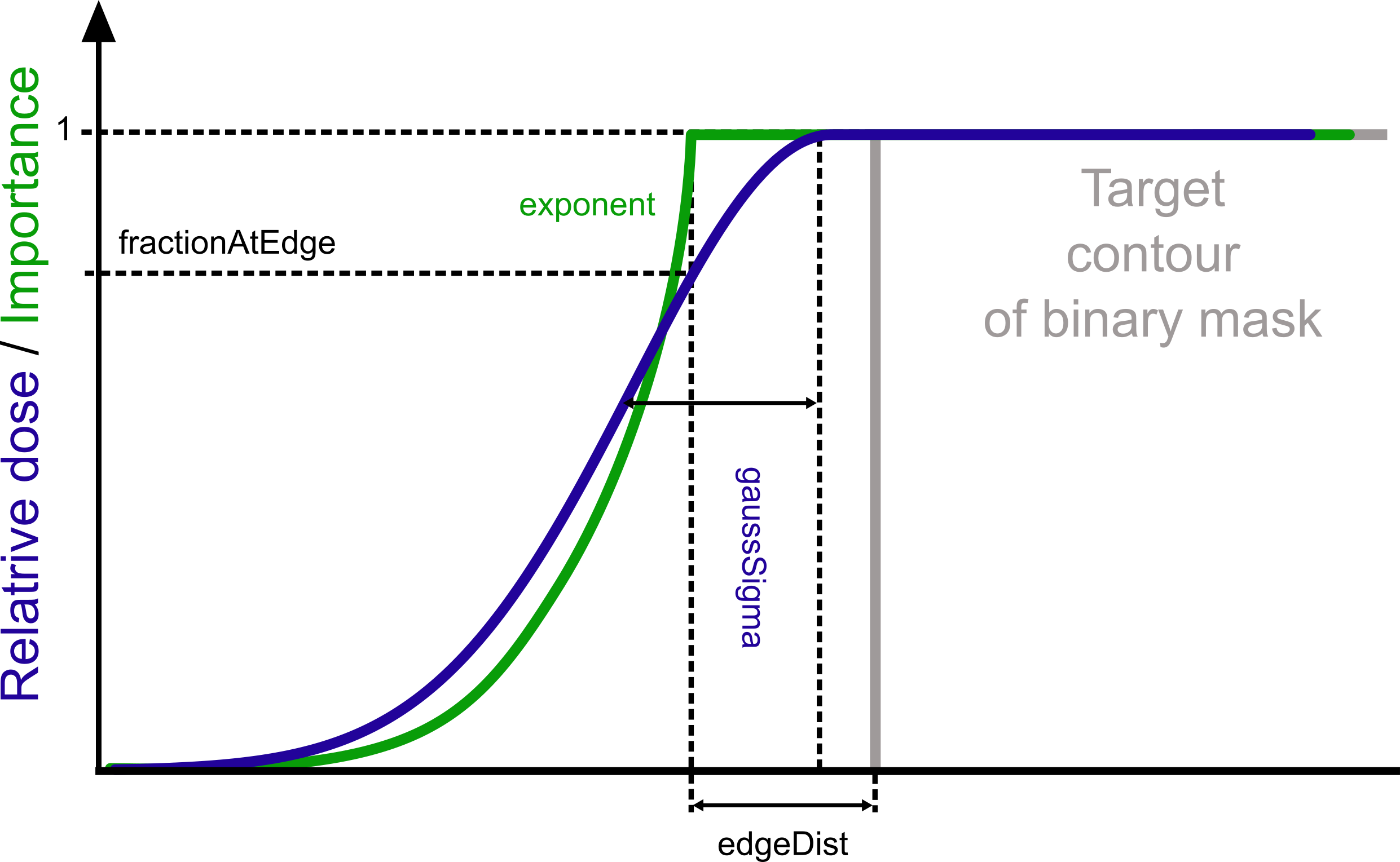
Definition of Gaussian and exponential margins.
Subimage extraction
Functions for getting subimages of lower dimension, e.g. a slice or a profile from a 3D image. The image must be an instance of a SimpleITK image and the same image, with the same dimension is returned. The subimages are calculated with a user-defined interpolation. The interpolation of ‘nearest’, ‘linear’ and ‘spline’ with order from 0 to 5 are available.
- fredtools.getSlice(img: Image, point: Iterable[int | float | number], plane: str = 'XY', displayInfo: bool = False, **kwargs) Image
Get 2D slice from image.
The function calculates a 2D slice image through a specified point in a specified plane from an image defined as a SimpleITK image object. The slice is returned as an instance of a SimpleITK image object of the same dimension but describing a slice (the dimension of only two axes are different than one). The slice through a specified point is calculated with a specified interpolation type.
- Parameters:
img (SimpleITK Image) – Object of a SimpleITK image.
point (array_like) – Point to generate the 2D slice through. It should have the length of the image dimension. A warning will be generated if the point is not inside the image extent and displayInfo is True.
plane (str, optional) – Plane to generate the 2D slice given as a string. The string should have the form of two letters from [XYZT] set with +/- signs (if no sign is provided, then + is assumed). For instance, it can be: XY,`ZY`,`-YX`, Y-T, etc. If the minus sign is found, then the image is flipped in the following direction. The order of the axis is important and the output will be generated in this way to be consistent with the axes displayed with matplotlib.pyplot.imshow. For instance, plane Z-X will display Z-axis on X-axis in imshow and Y-axis of imshow will be a reversed X-axis of the image. (def. ‘XY’)
displayInfo (bool, optional) – Displays a summary of the function results. (def. False)
**kwargs (optional) –
Additional keyword arguments determining the interpolation method:
interpolation : {‘linear’, ‘nearest’, ‘spline’}, determines the interpolation method (def. ‘linear’).
splineOrder : int, order of spline interpolation, must be in range 0-5 (def. 3).
- Returns:
An instance of a SimpleITK image object describing a slice.
- Return type:
SimpleITK Image
- Raises:
TypeError – If img is not an instance of a 3D or 4D SimpleITK image object.
AttributeError – If the dimension of point does not match the img dimension, or if the plane parameter cannot be recognised.
See also
Examples
The example below shows how to generate and display a 2D slice along ‘ZX’ (with reversed X) axes from a 3D image through a specified point of the 3D image.
>>> img3D = fredtools.readMHD('imageCT.mhd')
>>> sl2D = fredtools.getSlice(img3D, point=[0,-212.42,-654.8], plane='Z-X', displayInfo=True)
>>> matplotlib.pyplot.imshow(fredtools.arr(sl2D), extent=fredtools.getExtMpl(sl2D))
>>> matplotlib.pyplot.xlabel('Z [mm]')
>>> matplotlib.pyplot.ylabel('X [mm] (reversed)')
- fredtools.getProfile(img: Image, point: Iterable[int | float | number], axis: str = 'X', displayInfo: bool = False, **kwargs) Image
Get 1D profile from image along an axis.
The function calculates a 1D profile image through a specified point in a specified axis from an image defined as a SimpleITK image object. The profile is returned as an instance of a SimpleITK image object of the same dimension but describing a profile (the dimension of only one axes is different than one). The profile through a specified point is calculated with a specified interpolation type.
- Parameters:
img (SimpleITK Image) – An object of a SimpleITK image.
point (array_like) – Point to generate the 1D profile through. It should have the length of the image dimension. A warning will be generated if the point is not inside the image extent and displayInfo is True.
axis (str, optional) – Axis to generate the 1D profile given as a string. The string should have the form of one letter from [XYZT] set with +/- signs (if no sign is provided, then + is assumed). For instance, it can be: X,`Y`,`-Z`, etc. If the minus sign is found, then the image is flipped in the following direction. (def. ‘X’)
displayInfo (bool, optional) – Displays a summary of the function results. (def. False)
**kwargs (optional) –
Additional keyword arguments determining the interpolation method:
interpolation : {‘linear’, ‘nearest’, ‘spline’}, determines the interpolation method (def. ‘linear’).
splineOrder : int, order of spline interpolation, must be in range 0-5 (def. 3).
- Returns:
An object of a SimpleITK image describing a profile.
- Return type:
SimpleITK Image
- Raises:
TypeError – If img is not an instance of a SimpleITK image object, or if it already describes a profile.
AttributeError – If the dimension of point does not match the img dimension, or if the axis parameter cannot be recognised.
See also
Examples
The example below shows how to generate and display a 1D profile along ‘Y’ (reversed) axis from a 3D image through a specified point of the 3D image.
>>> img3D = fredtools.readMHD('imageCT.mhd')
>>> pr1D = fredtools.getProfile(img3D, point=[0,-212.42,-654.8], axis='-Y', displayInfo=True)
>>> matplotlib.pyplot.plot(fredtools.pos(pr1D), fredtools.vec(pr1D))
>>> matplotlib.pyplot.xlabel('Y [mm] (reversed)')
>>> matplotlib.pyplot.ylabel('Values')
- fredtools.getPoint(img: Image, point: Iterable[int | float | number], displayInfo: bool = False, **kwargs)
Get point value from image.
The function calculates a point value in a specified point from an image defined as a SimpleITK image object. The point is returned as an instance of a SimpleITK image object of the same dimension but describing a point (the dimension of all axes is equal to one). The point value in a specified point is calculated with a specified interpolation type.
- Parameters:
img (SimpleITK Image) – An object of a SimpleITK image.
point (array_like) – Point to generate the value. It should have the length of the image dimension. A warning will be generated if the point is not inside the image extent and displayInfo is True.
displayInfo (bool, optional) – Displays a summary of the function results. (def. False)
**kwargs (optional) –
Additional keyword arguments determining the interpolation method:
interpolation : {‘linear’, ‘nearest’, ‘spline’}, determines the interpolation method (def. ‘linear’).
splineOrder : int, order of spline interpolation, must be in range 0-5 (def. 3).
- Returns:
An instance of a SimpleITK image object describing a point.
- Return type:
SimpleITK Image
- Raises:
TypeError – If img is not an instance of a SimpleITK image object, or if it already describes a point.
AttributeError – If the dimension of point does not match the img dimension.
Examples
The example below shows how to generate a point value for various interpolation types from a 3D image in a specified point of the 3D image.
>>> img3D = fredtools.readMHD('imageCT.mhd')
>>> pointValue = fredtools.getPoint(img3D, point=[0,-212.42,-654.8])
>>> fredtools.arr(pointValue)
array(45, dtype=int16)
>>> fredtools.arr(fredtools.getPoint(img3D, point=[0,-212.42,-654.8], interpolation='nearest'))
array(37, dtype=int16)
>>> fredtools.arr(fredtools.getPoint(img3D, point=[0,-212.42,-654.8], interpolation='linear'))
array(45, dtype=int16)
>>> fredtools.arr(fredtools.getPoint(img3D, point=[0,-212.42,-654.8], interpolation='spline', splineOrder=5))
array(43, dtype=int16)
- fredtools.getInteg(img: Image, axis: str = 'X', displayInfo: bool = False) Image
Get 1D integral profile from an image.
The function calculates a 1D integral profile image along the specified axis from an image defined as a SimpleITK image object. The integral profile is returned as an instance of a SimpleITK image object of the same dimension but describing a profile (the dimension of only one axes is different than one). The integral means the sum of the voxel values multiplied by the voxel size along the accumulated directions. The routine is useful to calculate integral depth dose (IDD) distributions.
- Parameters:
img (SimpleITK Image) – An object of a SimpleITK image.
axis (str, optional) – Axis to generate the 1D integral profile given as a string. The string should have the form of one letter from [XYZT] set with +/- signs (if no sign is provided, then + is assumed). For instance, it can be: X, Y, -Z, etc. If the minus sign is found, then the image is flipped in the following direction. (def. “X”)
displayInfo (bool, optional) – Displays a summary of the function results. (def. False)
- Returns:
Instance of a SimpleITK image object describing a profile.
- Return type:
SimpleITK Image
- Raises:
TypeError – If img is not an instance of a SimpleITK image object, or if it already describes a profile.
AttributeError – If the axis parameter cannot be recognised.
See also
Examples
The example below shows how to generate and display a 1D integral profile along Y axis from a 3D image.
>>> img3D = fredtools.readMHD('imageCT.mhd')
>>> in1D = fredtools.getInteg(img3D, axis='Y', displayInfo=True)
>>> matplotlib.pyplot.plot(fredtools.pos(in1D), fredtools.vec(in1D))
>>> matplotlib.pyplot.xlabel('Y [mm]')
>>> matplotlib.pyplot.ylabel('Values per unitary volume')
- fredtools.getCumSum(img: Image, axis: str = 'X', displayInfo: bool = False) Image
Get cumulative sum image.
The function calculates a cumulative sum image along the specified axis from an image defined as a SimpleITK image object. The cumulative sum image is returned as an instance of a SimpleITK image object of the same dimension.
- Parameters:
img (SimpleITK Image) – An object of a SimpleITK image.
axis (str, optional) – An axis is used to generate the cumulative sum given as a string. The string should have the form of one letter from [XYZT] set. (def. “X”)
displayInfo (bool, optional) – Displays a summary of the function results. (def. False)
- Returns:
Instance of a SimpleITK image object describing the cumulative sum image (same size as img).
- Return type:
SimpleITK Image
- Raises:
TypeError – If img is not an instance of a SimpleITK image object.
AttributeError – If the axis parameter cannot be recognised.
See also
getIntegget 1D integral profile from an image.
- fredtools.getProfilePoints(img: Image, pointA: Iterable[int | float | number], pointB: Iterable[int | float | number], spacing: int | float | number = 1, origin: Literal['start', 'center', 'image'] | Iterable[int | float | number] = 'center', displayInfo: bool = False, **kwargs) Tuple[tuple, tuple]
Get 1D profile between points.
The function gets a profile of an image defined as a SimpleITK image object, between two points, pointA and pointB, with a given step size (spacing). The values at the given points are interpolated from the image.
- Parameters:
img (SimpleITK Image) – An object of a SimpleITK image.
pointA (array_like) – The starting point of the profile.
pointB (array_like) – The ending point of the profile.
spacing (scalar, optional) – The spacing between profile points. (def. 1)
origin ({'start', 'center', 'image'} or array_like, optional) –
The origin for the calculation of the profile positions. The following options are available:
’start’: positions calculated starting from pointA.
’center’: positions calculated with respect to the line centre.
’image’: positions calculated with respect to the image 0 point.
array_like: positions calculated with respect to the given point.
(def. ‘center’)
displayInfo (bool, optional) – Displays a summary of the function results. (def. False)
**kwargs (optional) –
Additional keyword arguments determining the interpolation method:
interpolation : {‘linear’, ‘nearest’, ‘spline’}, determines the interpolation method (def. ‘linear’).
splineOrder : int, order of spline interpolation, must be in range 0-5 (def. 3).
- Returns:
A tuple of the positions along the profile line and a tuple of the interpolated values at the profile points. The points outside the image extent get numpy.nan values.
- Return type:
tuple of two tuples
- Raises:
TypeError – If img is not an instance of a SimpleITK image object.
ValueError – If the dimension of pointA, pointB or the origin point does not match the img dimension, or if the origin parameter cannot be recognised.
Image creation
- fredtools.createEllipseMask(img: Image, point: Iterable[int | float | number], radii: int | float | number | Sequence[int | float | number], displayInfo: bool = False) Image
Create an Ellipse mask in the image field of reference.
The function creates an ellipse mask, defined with the centre and radii in the frame of reference of an image defined as a SimpleITK image object. Any dimension, i.e. 2D-4D, of the image is supported.
- Parameters:
img (SimpleITK Image) – An object of a SimpleITK image.
point (array_like) – A point describing the position of the centre of the ellipse. The dimension must match the image dimension.
radii (scalar or sequence (list/tuple)) – Radii of the ellipse for each dimension in [mm] (physical units, not voxels). It might be a scalar, then the same radii will be used in each direction.
displayInfo (bool, optional) – Displays a summary of the function results. (def. False)
- Returns:
An instance of a SimpleITK image object describing a binary mask (i.e. type ‘uint8’ with 0/1 values).
- Return type:
SimpleITK Image
- Raises:
TypeError – If img is not an instance of a SimpleITK image object, or if radii is not a scalar or an iterable.
ValueError – If the length of radii or point does not match the image dimension.
See also
mapStructToImgmapping a structure to an image to create a mask.
setValueMasksetting values of the image inside/outside a mask.
cropImgToMaskcrop an image to mask.
createCylinderMaskcreate a cylinder mask.
createConeMaskcreate a cone mask.
createBoxMaskcreate a box mask.
- fredtools.createConeMask(img: Image, startPoint: Iterable[int | float | number], endPoint: Iterable[int | float | number], startRadius: int | float | number, endRadius: int | float | number, displayInfo: bool = False) Image
Create a cone mask in the image field of reference.
The function creates a cone mask, defined with starting and ending points and radii in the frame of reference of an image defined as a SimpleITK image object describing a 3D image. Only 3D images are supported. The cone bases are flat, i.e. the ends of the cone are not rounded.
- Parameters:
img (SimpleITK Image) – Object of a SimpleITK 3D image.
startPoint (array_like) – 3-element point describing the position of the centre of the first cone base.
endPoint (array_like) – 3-element point describing the position of the centre of the second cone base.
startRadius (scalar) – Radius of the first cone base in [mm] (physical units, not voxels).
endRadius (scalar) – Radius of the second cone base in [mm] (physical units, not voxels).
displayInfo (bool, optional) – Displays a summary of the function results. (def. False)
- Returns:
An instance of a SimpleITK image object describing a binary mask (i.e. type ‘uint8’ with 0/1 values).
- Return type:
SimpleITK Image
- Raises:
TypeError – If img is not an instance of a SimpleITK 3D image object.
See also
mapStructToImgmapping a structure to an image to create a mask.
setValueMasksetting values of the image inside/outside a mask.
cropImgToMaskcrop an image to mask.
createCylinderMaskcreate a cylinder mask.
createEllipseMaskcreate an ellipse mask.
createBoxMaskcreate a box mask.
- fredtools.createCylinderMask(img: Image, startPoint: Iterable[int | float | number], endPoint: Iterable[int | float | number], radius: int | float | number, displayInfo: bool = False) Image
Create a cylindrical Mask in the image field of reference
The function creates a cylindrical mask with a given radius and height calculated from the starting and ending points of the cylinder in the frame of references of an image defined as a SimpleITK image object describing a 3D image. Only 3D images are supported. For instance, the routine might help make a geometrical acceptance correction of a chamber used for Bragg peak measurements. The routine was adapted from a GitHub repository: https://github.com/heydude1337/SimplePhantomToolkit/.
- Parameters:
img (SimpleITK Image) – Object of a SimpleITK 3D image.
startPoint (array_like) – 3-element point describing the position of the centre of the first cylinder base.
endPoint (array_like) – 3-element point describing the position of the centre of the second cylinder base.
radius (scalar) – Radius of the cylinder in [mm] (physical units, not voxels).
displayInfo (bool, optional) – Displays a summary of the function results. (def. False)
- Returns:
An instance of a SimpleITK image object describing a mask (i.e. type ‘uint8’ with 0/1 values).
- Return type:
SimpleITK Image
- Raises:
TypeError – If img is not an instance of a SimpleITK 3D image object.
See also
mapStructToImgmapping a structure to an image to create a mask.
setValueMasksetting values of the image inside/outside a mask.
cropImgToMaskcrop an image to mask.
createConeMaskcreate a cone mask.
createEllipseMaskcreate an ellipse mask.
createBoxMaskcreate a box mask.
- fredtools.createBoxMask(img: Image, point: Iterable[int | float | number], size: int | float | number | Sequence[int | float | number], displayInfo: bool = False) Image
Create a Box mask in the image field of reference.
The function creates a box mask, defined with the centre point and size in the frame of reference of an image defined as a SimpleITK image object. Any dimension, i.e. 2D-4D, of the image is supported.
- Parameters:
img (SimpleITK Image) – An object of a SimpleITK image.
point (array_like) – A point describing the position of the centre of the box. The dimension must match the image dimension.
size (scalar or sequence (list/tuple)) – Size of the box for each dimension in [mm] (physical units, not voxels). It might be a scalar, then the same size will be used in each direction.
displayInfo (bool, optional) – Displays a summary of the function results. (def. False)
- Returns:
An instance of a SimpleITK image object describing a binary mask (i.e. type ‘uint8’ with 0/1 values).
- Return type:
SimpleITK Image
- Raises:
TypeError – If img is not an instance of a SimpleITK image object, or if size is not a scalar or an iterable.
ValueError – If the length of size or point does not match the image dimension.
See also
mapStructToImgmapping a structure to an image to create a mask.
setValueMasksetting values of the image inside/outside a mask.
cropImgToMaskcrop an image to mask.
createCylinderMaskcreate a cylinder mask.
createEllipseMaskcreate an ellipse mask.
createConeMaskcreate a cone mask.
- fredtools.createImg(size: Sequence[int] = [10, 20, 30], components: Annotated[int, Ge(ge=0)] = 0, spacing: Sequence[int | float | number] = [1, 1, 1], origin: Sequence[int | float | number] = [0.5, 0.5, 0.5], centred: bool = False, fillRandom: bool = False, displayInfo: bool = False) Image
Create an empty image with a given size, spacing, and origin.
The function creates an empty image, i.e. filled with 0 values (or Gaussian noise if fillRandom is True), with a given size, spacing, and origin. The image can be 2D or 3D.
- Parameters:
size (Sequence[int], optional) – The size of the image in each dimension. Must be a sequence of 2 or 3 integers. (def. [10, 20, 30])
components (NonNegativeInt, optional) – The number of components per pixel. Must be a non-negative integer. The value 0 creates a scalar image and a value greater than or equal to 1 creates a vector image with that number of components. (def. 0)
spacing (Sequence[Numeric], optional) – The spacing between pixels in each dimension. Must be a sequence of numbers. (def. [1, 1, 1])
origin (Sequence[Numeric], optional) – The origin of the image in each dimension. Must be a sequence of numbers. It is ignored when centred is True. (def. [0.5, 0.5, 0.5])
centred (bool, optional) – If True, the origin is centred and the origin parameter is ignored. (def. False)
fillRandom (bool, optional) – If True, the image is filled with random Gaussian white noise (mean=10, std=1). (def. False)
displayInfo (bool, optional) – Displays a summary of the function results. (def. False)
- Returns:
The created image.
- Return type:
SITKImage
- Raises:
ValueError – If the size is not 2D or 3D, if components is a negative integer, or if spacing does not have the same length as size.
See also
mapStructToImgmapping a structure to an image to create a mask.
setValueMasksetting values of the image inside/outside a mask.
cropImgToMaskcrop an image to mask.
createCylinderMaskcreate a cylinder mask.
createConeMaskcreate a cone mask.
createEllipseMaskcreate an ellipse mask.
createBoxMaskcreate a box mask.
Influence matrix manipulation
Functions for manipulating influence matrices read with fredtools.getInmFREDSparse(). The influence matrix is defined as an instance of a scipy.sparse.csr_matrix or cupyx.scipy.sparse.csr_matrix object. In case of the cupyx.scipy.sparse.csr_matrix object, the calculations are performed on a GPU.
- fredtools.inmSumVec(inmSparse: csr_matrix | csr_matrix, weights: Iterable[int | float | number], displayInfo: bool = False) NDArray
Sum up the influence matrix to a vector.
The function sums up the influence matrix for a given set of pencil beams and their weights. The influence matrix must be a sparse matrix. The function returns a summed influence matrix as an array. The sparse matrix can be given as an instance of a scipy.sparse.csr_matrix or cupyx.scipy.sparse.csr_matrix object. In case of the cupyx.scipy.sparse.csr_matrix object, the multiplication and summing will be performed on GPU.
- Parameters:
inmSparse (scipy.sparse.csr_matrix or cupyx.scipy.sparse.csr_matrix) – Sparse matrix of the influence matrix.
weights (array_like) – Array of weights for each pencil beam.
displayInfo (bool, optional) – Displays a summary of the function results. (def. False)
- Returns:
Summed influence matrix. A cupy array is returned when inmSparse is a cupy sparse matrix, and a numpy array otherwise.
- Return type:
numpy.ndarray or cupy.ndarray
- Raises:
ValueError – If inmSparse is not a sparse matrix, or if the number of weights is not equal to the number of pencil beams in the influence matrix.
See also
inmSumImgsum up the influence matrix and create an image.
- fredtools.inmSumImg(inmSparse: csr_matrix | csr_matrix, weights: Iterable[int | float | number], imgBase: Image, displayInfo: bool = False) Image
Sum up the influence matrix and create an image.
The function sums up the influence matrix for a given set of pencil beams and their weights. The influence matrix must be a sparse matrix and the number of its columns must be equal to the total number of voxels of imgBase, i.e. the product of the imgBase size in each direction. The function returns a summed influence image defined as an instance of a SimpleITK object that inherits the frame of reference of imgBase. If the summed influence vector is a cupy array (i.e. inmSparse is a cupy sparse matrix), it is converted to a numpy array before the image is built. The function is useful for calculating the sum of the influence matrix for a set of pencil beams.
- Parameters:
inmSparse (scipy.sparse.csr_matrix or cupyx.scipy.sparse.csr_matrix) – Sparse matrix of the influence matrix.
weights (array_like) – Array of weights for each pencil beam.
imgBase (SimpleITK.Image) – Base image for the influence matrix.
displayInfo (bool, optional) – Displays a summary of the function results. (def. False)
- Returns:
Summed influence image with the frame of reference of imgBase.
- Return type:
SimpleITK.Image
- Raises:
ValueError – If inmSparse is not a sparse matrix, if the number of weights is not equal to the number of pencil beams in the influence matrix, or if the number of columns of inmSparse is not equal to the total number of voxels of imgBase.
See also
inmSumVecsum up the influence matrix to a vector.